CATS Report Options
CATS Report Options
This is a list of all options available on reports. Each option is a filter that changes which records will appear on the reports, how the records are displayed, or the visual output of the report.
To change these filters, highlight the report you want to change from the saved report format list, and click the Modify button.
Options Available on All Reports
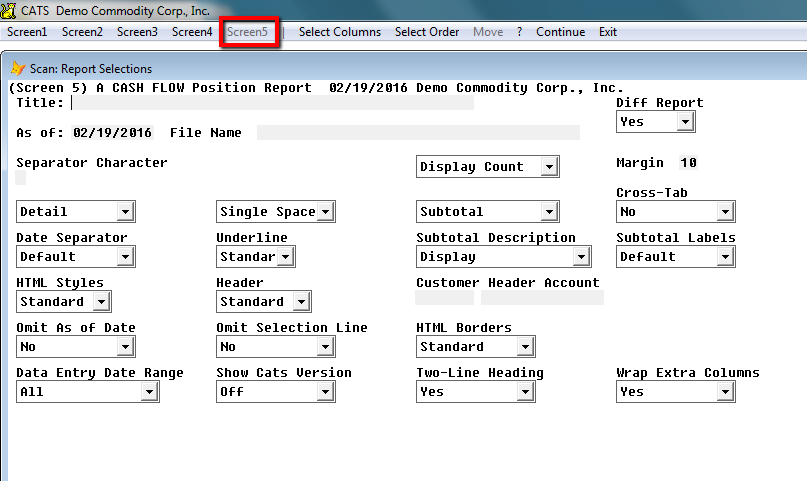
The options displayed below, found when you click on Screen 5 from the toolbar menu while modifying a report, are available on all reports in CATS. They allow users to customize the style of the report output.
\
Title - The title is what will display at the top of the report. This can be left blank.
As of: - Change the As of date for this report. This will force
CATS to display the data as it was on a certain date. For example, if
today is 09\01\2017, but you set the As of date to 08\15\2017,
you will see the records that were input or matched the selected filters
on 08\15\2017.
This can be useful for seeing what was in warehouse as of a certain date, or what accounting entries were made after a certain date, regardless of the date of the entries. CATS keeps track of when most changes were made in the system to facilitate use of this filter.
This option only works on certain reports or for certain types of data. The As of date will be saved for all reports of the same type until you exit the list of saved reports. So if you print the report file ALL WITH INVOICES, change the As of date to ''09/01/2017'', then print the report ALL NO INVOICE, the As of date for the second report will also be ''09/01/2017''.\ Otherwise, the As of date resets after every printing.
For isolated areas, the As of date defaults to the isolated period date.
File Name - If the output location for this report is a file, you can name the file using this option.
Diff Report -
- No - Do not treat this report as a Difference report.
- Yes - Save this report into the Difference Report area, allowing you to use a Difference report to find changes between printings of this report.
Separate Character
Detail - This option will show all details on the report.
Summary- This option will show only a summary of the totals. No
details shown.\
Single Space, Double Space - Lets you choose single or double space when printing to a printer.\
Subtotal - Subtotal - shows subtotals, Do Not Subtotal - does not show any subtotals just overall totals, No Group Totals, No Totals - No totals shown at all, No Sub-Heading
Cross-Tab - No, Top, Bottom, Cross- Tab Only
Date Separator - Default, “/”, “_”
Underline - Standard - Totals and subtotals are underlined,
Default - Totals and subtotals are not underlined, Yes - Totals and
subtotals are underlined , No - Totals and subtotals are not
underlined.
Subtotal Description - Display, Omit, End of Total, Start of Total
Line This report option lets you move or omit the description for the
subtotal line. Choosing the display option will put the description at
the start of the total line.\
Subtotal Labels - Default, Value
HTML Styles - Standard, Select, CATS Default
Select will let user view, edit and change fonts and colors on the
report.\
Omit As of Date - No, Yes
HTMl Borders - Standard, Yes, No
Data Entry Date Range - All, Select, Previous, Year To Date, Current Year, Previous Month, Previous 30 Days, Current Month, Rest Of Month, Next 30 Days, Next Month, Yesterday, Today, Tomorrow, No Date, Any Date, Past, Future
Show Cats Version - Off, On
Two- Line Heading - Standard, No,Yes - This setting lets you make
the heading on one line or two for printing to a printer.
Wrap Extra Columns - Yes, No
Position Report Options
The following options are available on all or most position reports.
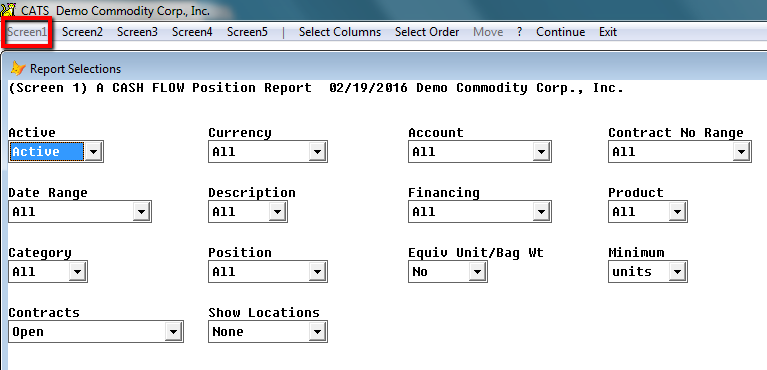
Screen 1:
Active - Active, All, Inactive
Currency - All, Select, Exclude, Match, MatchExclude, Any Not USD,
None Only USD.
Account - All, Select, Supplier/Customer
Contract No Range- All, Select, Purchases Only, Sales Only\
Date Range - All, Select, Previous Year, Year To Date, Current Year,
Previous Month, Previous Month, Previous 30 Days, Month To Date, Current
Month, Rest Of Month, Next Month, Yesturday, Today, Tomorrow, No Date,
Any Date, Past, Future
Description - All, Select, Exclude, Match, Match Exclude
Financing - All, Preshiment, Consignment, Exclude Preship, Exclude
Consign, ExcPreshp/Cnsgn, Open Collateral, Advance, Non- Advance
Product - All, Select, Exclude, Match, MatchExclude
Category - Select, Exclude, Match, Match Exclude
Position - All, Select, Spot, Futures
Equiv Unit/Bag Wt - Yes, No
Minimum - Units, Lb, Kg
Open Position Report
Here are options unique to the open position report type.
Screen 1:
\
Active - Active, All, Inactive
Currency - All, Select, Exclude, Match, MatchExclude, Any Not USD,
None Only USD.
Account - All, Select, Supplier/Customer
Contract No Range- All, Select, Purchases Only, Sales Only\
Date Range - All, Select, Previous Year, Year To Date, Current Year,
Previous Month, Previous Month, Previous 30 Days, Month To Date, Current
Month, Rest Of Month, Next Month, Yesturday, Today, Tomorrow, No Date,
Any Date, Past, Future
Description - All, Select, Exclude, Match, Match Exclude
Financing - All, Preshiment, Consignment, Exclude Preship, Exclude
Consign, ExcPreshp/Cnsgn, Open Collateral, Advance, Non- Advance
Product - All, Select, Exclude, Match, MatchExclude
Category - Select, Exclude, Match, Match Exclude
Position - All, Select, Spot, Futures
Equiv Unit/Bag Wt - Yes, No
Minimum - Units, Lb, Kg
Contracts - All, Inventory, Billed Out, Open/Inventory/TBf, Prov
Invioced, Unfixed, Activity, Completed Incl A/R, Not Completed A/R
Currency, All, Select, Exclude, Match, Match Excluded, Any: Not USD,
None: Only USD
Show Locations - Allocated, None, All, Unallocated, Not Blank,
Blank\
Screen 2
\
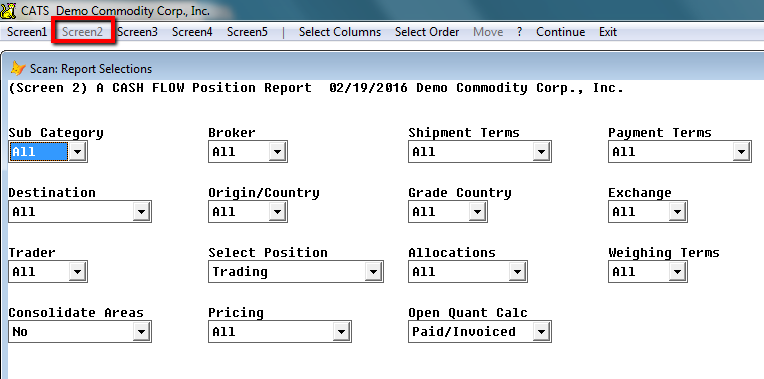
Sub Category - All, Select, Exclude, Match, Match Excluded, Any,
None
Broker - All, Select, Exclude, Match, Match Excluded, Any, None
Shipment Terms - All, Select Terms, Purchase Terms, Sale, Terms
Payment Terms - All, Select Terms, Purchase Terms, Sale terms
Destination - All, Open Destination, Select
Origin/Country - All, Select, Exclude, Match, Match Exclude, Any,
None
Grade Country - All, Select, Exclude, Match, Match Exclude, Any,
None
Exchange - All, Select, Exclude, Match, Match Exclude, Any, None
Trader - All, Select, Exclude, Match, Match Exclude, Any, None
Select Position - Trading, Shipment, Valuation, Differential
Allocations - All, Unallocated, Allocated
Weighing Terms All, Select, Purchase, Sale
Consolidate Areas - No, Summary, Detail
Pricing - All, Stated, To Be Fixed, Fixed, Fixed Stated, Prov
Bought, Invcd
Open Quant Calc - “Paid/Invoiced” will show the amount of units that
are on the contract item minus the units on sale invoices. “Paid For”
will show just the amount of units that have no purchase invoice.
Trader - All, Select, Exclude, Match, Match Excluded, Any, None\
Screen 3
\
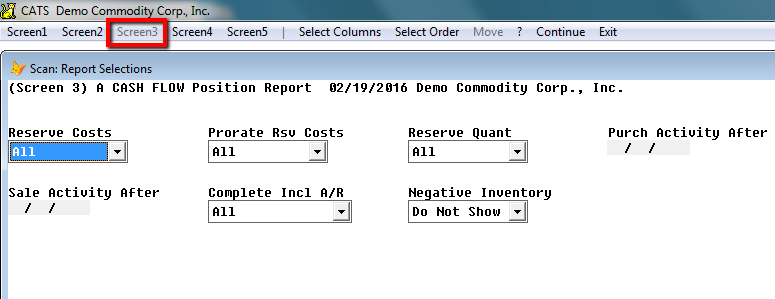
Reserve Costs - All, Purchases, Sales
Prorate Rsv Costs - All, None, Reserved Amt, Actual Amt
Reserve Quant - All, Open, Inventory, Bought, Sold
Purch Activity After
Sale Activity After
Complete Incl A/R - All, Select, Previous Year, Year to Date,
Current Year, Previous Month, Previous 30 Days, Month to Date, Current
Month, Rest of Month, Next 30 Days, Next Month, Yesturday, Today,
Tomorrow, No Date, Any Date, Past, Future
Negative Invetory - Show, Do Not Show\
Screen 4
\
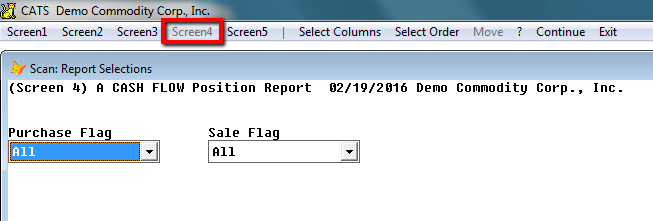
Purchase Flag - All, Select- Any, Select-All, Exclude- Any, Exclude
All, Advanced
Sale Flag - All, Select- Any, Select- All, Exclude- Any, Exclude
All, Advanced\
Screen 5
Title
As of - 11/19/2014
File Name
Diff Report - Yes, No\
Separator Character
Display Count, No Count
Margin - 10
Detail, Summary
Single Space, Double Space
Subtotal, Do Not Subtotal, No Group Totals, No Totals, No Sub- Heading
Cross-Tab - No, Top, Bottom, Cross-Tab Only
Date Separator - Default, “/”, “-”
Underline - Standard, Default, Yes, No, Standard
Subtotal Description - Display, Omit, End Total Line, Start of Total
Line
Subtotal Labels - Default, Value
HTMl Styles -
Purchase Purchase Flag - All, Select - Any, Select - All, Exclude- Any, Exclude- All, Advanced
Sale Flag - All, Select - Any, Select - All, Exclude - Any, Exclude - All, Advanced\
Traffic/Insurance
Here are some options unique to traffic/ insurance report types.
Screen 1
\
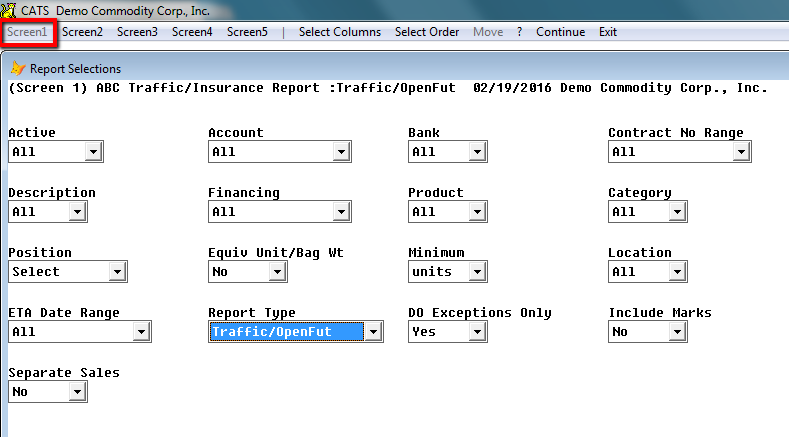
Account Range- All, Select, Supplier\
Bank- All, Select, Exclude, Match, MatchExcluded, Any, None\
Contract No Range- All, Select, Purchase Only, Sales Only\
Description - All, Select, Exclude, Match, MatchExcluded
Financing - All preshipment, Consignment, Exclude Preship, Exclude
Consign, ExcPreshp\Cnsgn, Open Collateral\
Product- All, Select, Exclude, Match, MatchExcluded
Category- All, Select, Exclude, Match, MatchExcluded
Position- All, Select, Spot, Futures\
Equiv Unit- Yes, No\
Minimum- Units\
Location Screen-All, Select, Exclude, Match, MatchExcluded\
Date Range-All, Select, Previous Year, Year To Date, Current Year,
Previous Month, Previous Month, Previous 30 Days, Month To Date, Current
Month, Rest Of Month, Next Month, Yesterday, Today, Tomorrow, No Date,
Any Date, Past, Future
Report Type-Afloat, Warehouse, Exdock, WH Insurance, Open Shipment,
Open Dest, Other\
Do Exceptions Only-Yes, No\
Include Marks-Yes, No\
Screen 2
\
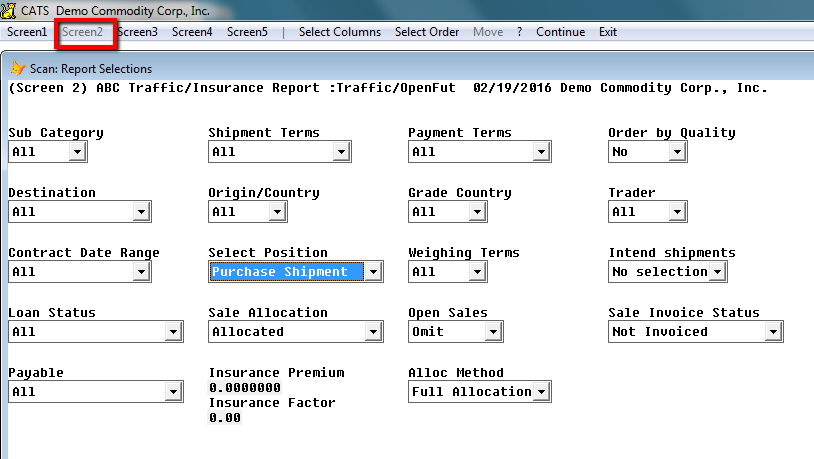
Sub Category- All, Select, Exclude, Match, MatchExcluded, Any, None\
Shipment Terms- Select Terms, Purchase Terms, Sale Terms\
Payment Terms- Select Terms, Purchase Terms, Sale Terms\
Order by Quality- Yes, No\
Destination- All, Open, Select\
Origin/Country- All, Select, Exclude, Match, MatchExcluded, Any, None\
Grade Country- All, Select, Exclude, Match, MatchExcluded, Any, None\
Trader- All, Select, Exclude, Match, MatchExcluded, Any, None\
Contract Date Range-All, Select, Previous Year, Year To Date,
Current Year, Previous Month, Previous Month, Previous 30 Days, Month To
Date, Current Month, Rest Of Month, Next Month, Yesterday, Today,
Tomorrow, No Date, Any Date, Past, Future
Select Position- Purchase shipment, Sale trading, Sale shipment,
Purchase Valuation, Sale Valuation, Purchase differential, Sale
differential\
Weighing Terms- All, Select, Purchase, Sale
Intend shipments- No Selection\
Loan Status- All, Collateral, No Collateral
Sale Allocation- All, Allocated, Unallocated, Cross Allocated
Open Sales- Include, Omit
Sale Invoice Status- Invoiced or not, Invoiced Only, Not Completed,
Invoiced and Priced, Provisional Sale, Provisional Purchase, Status
Exception
Payable- All, Booked, Not Booked
Alloc Method- All, Free, Full\
Screen 3
\
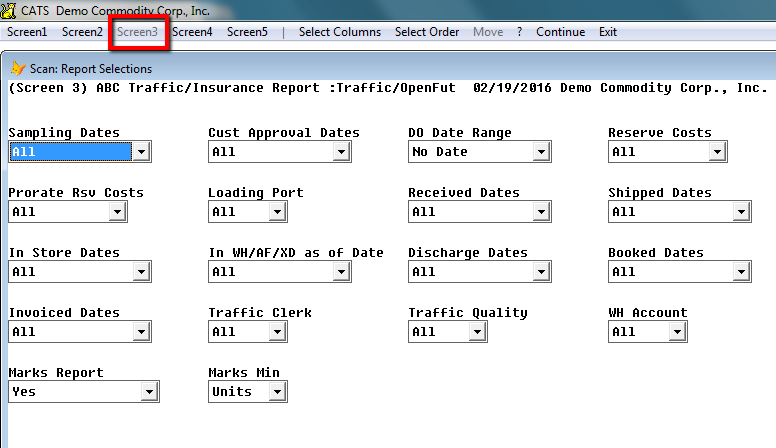
Sampling Dates-All, Select, Previous Year, Year to date, Current Year, Previous Month, Previous 30 day\
Customer Approval Dates-All, Select, Previous Year, Year to date, Current Year, Previous Month, Previous 30 day\
DO Date Range-All, Select, Previous Year, Year to date, Current Year, Previous Month, Previous 30 day\
Reserve Costs-All, Purchase, Sales\
Prorate RSV Costs-All, None, Reserved, Actual\
Loading Port-All, Open, Select\
Received Dates-All, Select, Previous Year, Year to date, Current Year, Previous Month, Previous 30 day\
Shipped Dates-All, Select, Previous Year, Year to date, Current Year, Previous Month, Previous 30 day\
In Store Dates-All, Select, Previous Year, Year to date, Current Year, Previous Month, Previous 30 day\
In WH/AF/XD as of date-All, In WH as of date, Afloat as of date, XD
as of date
Discharge Dates-All, Select, Previous Year, Year to date, Current
Year, Previous Month, Previous 30 day\
Booked Dates-All, Select, Previous Year, Year to date, Current Year, Previous Month, Previous 30 day\
Invoiced Dates-All, Select, Previous Year, Year to date, Current Year, Previous Month, Previous 30 day\
Traffic Clerk-All, Select, Exclude, Match, MatchExcluded, Any, None\
Traffic Quality-All, Select, Exclude, Match, MatchExcluded, Any, None\
WH Account-All, Select, Exclude, Match, MatchExcluded, Any, None\
Marks Report-Yes, No\
Marks Min-Units, Lb, Kg
Screen 4
\
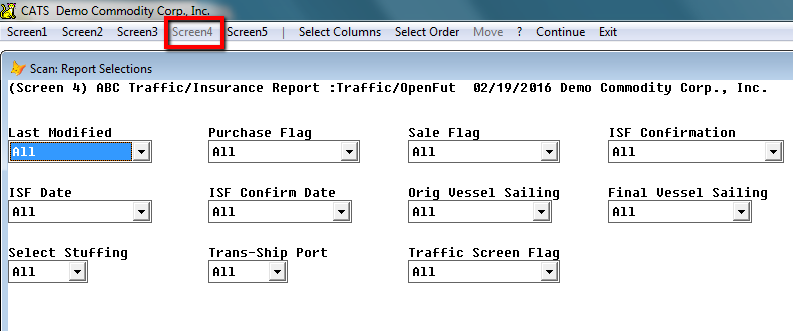
Last Modified- All, Select, Previous Year, Year to date, Current Year, Previous Month, Previous 30 day\
Purchase Flag- All, Select Any, Select All, Exclude Any, Exclude All, Advanced
Sale Flag-All, Select Any, Select All, Exclude Any, Exclude All, Advanced
ISF Confirmation- All, Required, Missing Entered, Not Required, Entered and not Required\
ISF Date- All, Select, Previous Year, Year to date, Current Year, Previous Month, Previous 30 day\
ISF Confirm Date-All, Select, Previous Year, Year to date, Current Year, Previous Month, Previous 30 day\
Orig Vessel Sailing-All, Select, Previous Year, Year to date, Current Year, Previous Month, Previous 30 day\
Final Vessel Sailing-All, Select, Previous Year, Year to date, Current Year, Previous Month, Previous 30 day\
Select Stuffing-All, Select, Exclude, Match, MatchExcluded, Any, None\
Trans-Ship Port- Open, Select\
Traffic Screen Flag-All, Select All, Select Purchase, Select Traffic, Advanced\
Production
Here are some options unique to production report types.
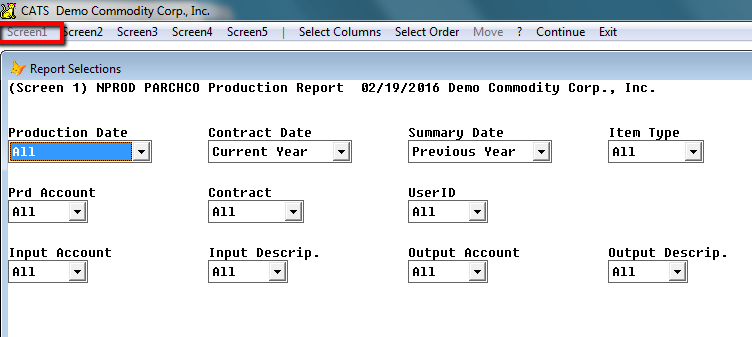
Screen 1
Production date-All, Select, Previous Year, Year to date, Current Year, Previous Month, Previous 30 day\
Contract date-All, Select, Previous Year, Year to date, Current Year, Previous Month, Previous 30 day\
Summary date-All, Select, Previous Year, Year to date, Current Year, Previous Month, Previous 30 day\
Item Type- All, Inputs Only, Outputs Only
Prd Account- All, Select
Contract- Contract, No Contract
UserID-All, Select, Exclude, Match, MatchExcluded\
Input Account-All, Select\
Input Description-All, Select, Exclude, Match, MatchExcluded\
Output Account-All, Select
Output Descrip.-All, Select, Exclude, Match, MatchExcluded\
Contract History
Here are some unique options unique to contract history report types.\
Screen 1
\
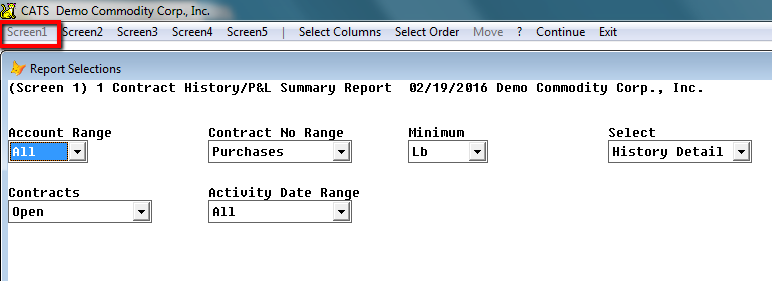
Account Range-All, Select, Exclude, Match, MatchExcluded\
Contract No Range-Purchases, Sales\
Minimum-units, lb, kg\
Select-History detail, summary report, both\
Contracts-All, Current activity, Open, Open Priced, Open unfixed, Inventory\
Activity Date Range-All, Select, Previous Year, Year to date, Current Year, Previous Month, Previous 30 day\
Screen 2
\
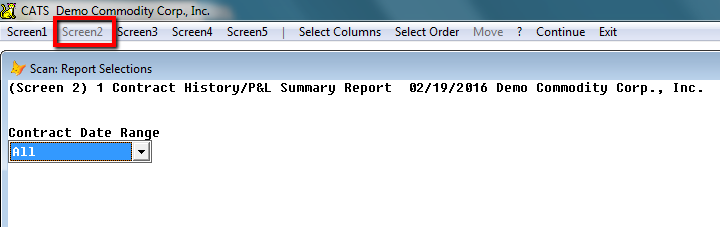
Contract Date Range-All, Select, Previous Year, Year to date, Current Year, Previous Month, Previous 30 day\
Inventory
Here are some options unique to inventory report types.
Screen 1
\
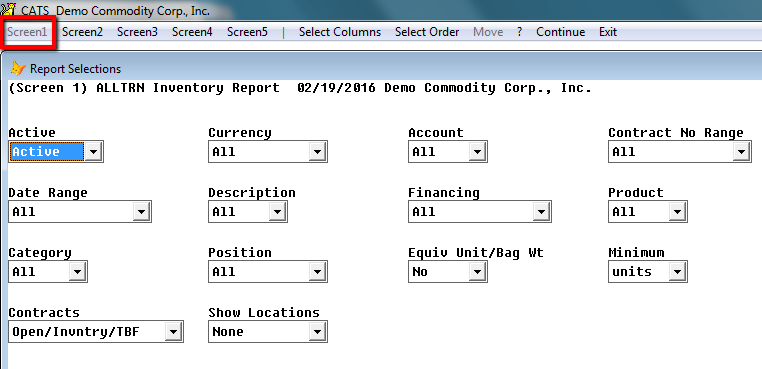
Financing- All, Preshipment, Consignment, Exclude Preship, Exclude Consign, ExcPreshp, Cnsgn, Open Collateral\
Product-All, Select, Exclude, Match, MatchExcluded
Contract- Open/Inventory, Open/Inventory/TBF, Prov Invoiced,
Unfixed, Activity, Completed Incl A\R, Not Completed A/R
Show Locations- Allocated, None, All, Unallocated, Not Blank, Blank
Screen 2
\
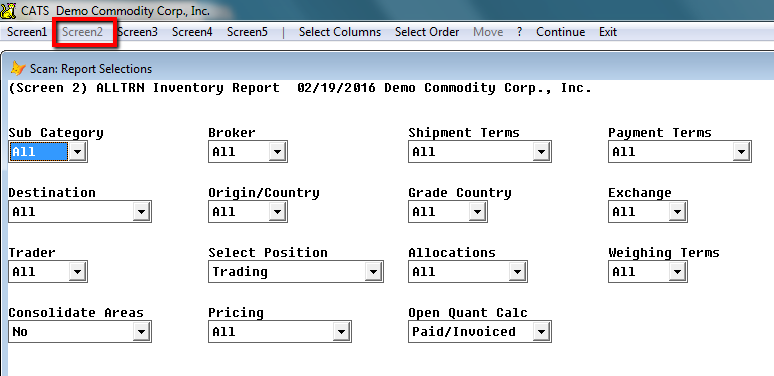
Weighing Terms- All, Select, Purchase, Sale\
Consolidate Areas- No, Summary, Detail\
Pricing- All, Stated, To Be Fixed, Fixed, Fixed/Stated, Prov Bought
Open Quant Calc- Paid/Invoiced, Paid For\
Screen 3
\
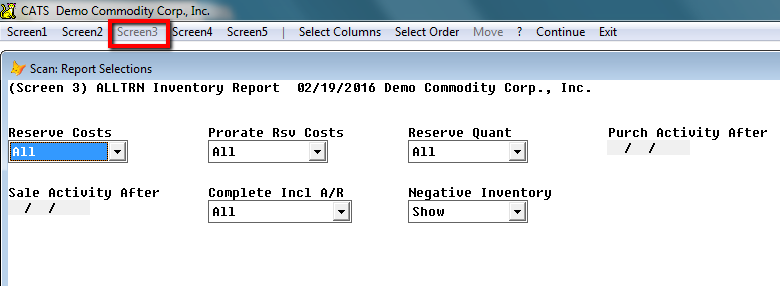
Reserve Costs- All, Purchases, Sales\
Prorate RSV Costs- None, Reserved Amt, Actual Amt\
Reserve Quant- All, Open, Inventory, Bought, Sold\
Complete Incl A/R- All, Select, Previous Year, Year to date, Current Year, Previous Month, Previous 30 day\
Negative Inventory-Show, Do Not Show\
Screen 4
\
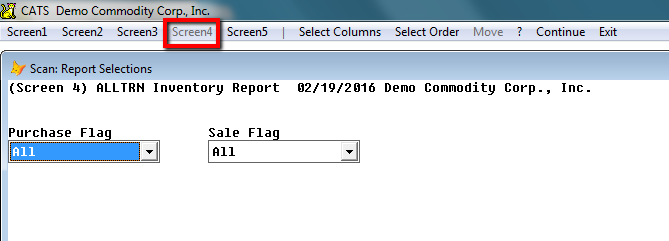
Purchase Flag-Select Any, Select All, Exclude Any, Exclude All, Advanced\
Sale Flag-Select Any, Select All, Exclude Any, Exclude All, Advanced\
Buyer/Seller History
Here are some options unique to buyer/seller history.
Buyer History
Screen 1
\
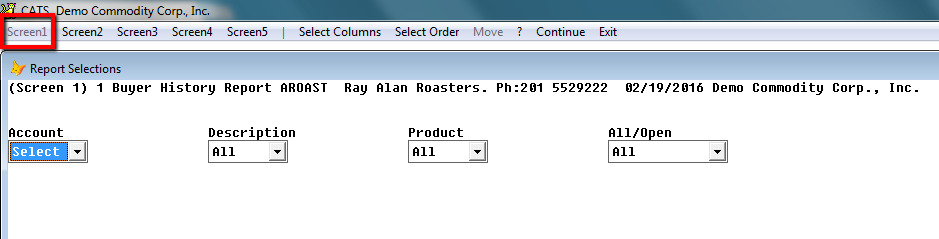
Account- All, Select
Description- All, Select, Exclude, Match, Match Excluded
Product- All, Select, Exclude, Match, Match Excluded
All/Open- All, Open\
Screen 2
\
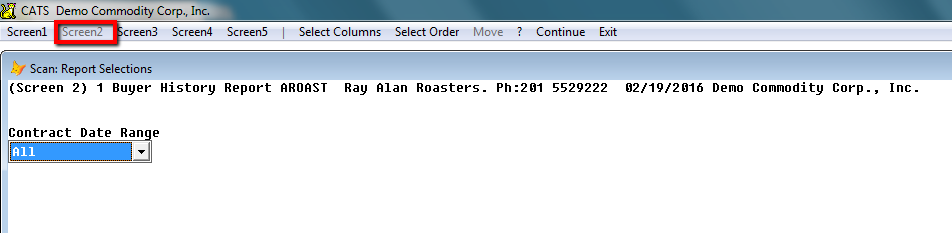
Contract Date Range- All, Select, Previous Year, Year to date, Current Year, Previous Month, Previous 30 day\
Seller History
Same screen selections as buyer history.\
Screen 1
\
Account- All, Select
Description- All, Select, Exclude, Match, Match Excluded
Product- All, Select, Exclude, Match, Match Excluded
All/Open- All, Open\
Screen 2
\
Contract Date Range- All, Select, Previous Year, Year to date, Current Year, Previous Month, Previous 30 day\
Net Physical Position
Here are some options unique to net position reports.\
Screen 1
\
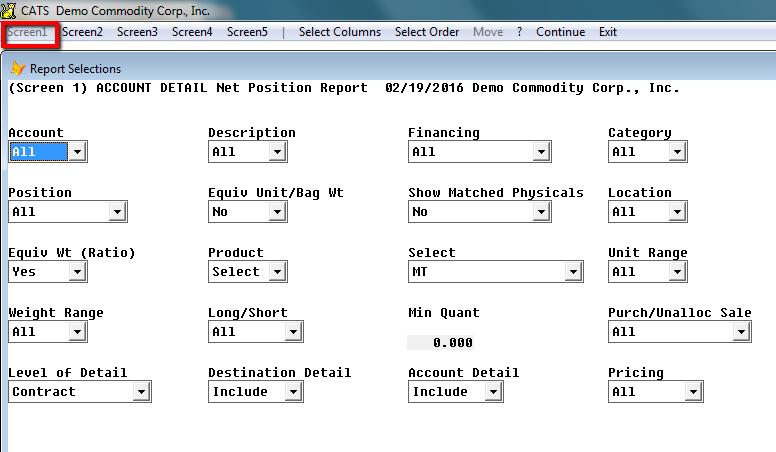
Financing-All, Preshipment, Consignment, Exclude Preship, Exclude Consign, ExcPreshp, Cnsgn, Open Collateral\
Equiv Wt- Yes, No\
Product- Select\
Select- MT, Equiv MT, 69kg Bags, Short, Tons, Contracts, P/L Total, P/L Rate\
Unit Range- All, Select\
Weight Range- All, Select\
Long/Short- All, Long, Short, Separate\
Purch UnAlloca Sale- Purchased, Unallocated\
Level of Detail- Subcat grade, Contract, Category, Grade/Loc4, Traffic Screen\
Dest Detail- Include, Omit\
Account Detail-Include, Omit\
Pricing- Priced, Unpriced, Separate\
Screen 2
\
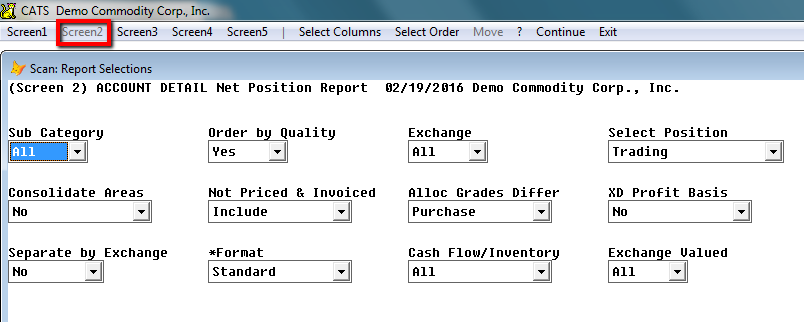
Select Position- Trading, Shipment, Valuation, Differential\
Consolidate Areas- No, Summary, Detail\
Not Priced and Invoiced- Exclude, Include, Only these Items\
Alloc Grades Differ- Purchase, Sale, No Override\
XD Profit Basis- Yes, No\
Format- WH cu 1234ltr, WH AF cu123ltr, Standard\
Cash Flow/Inventory- All, Cash Flow, Inventory\
Exchange Valid- All, Yes, No\
Inventory Transactions
Here are some options unique to inventory transaction reports.\
Screen 1
\
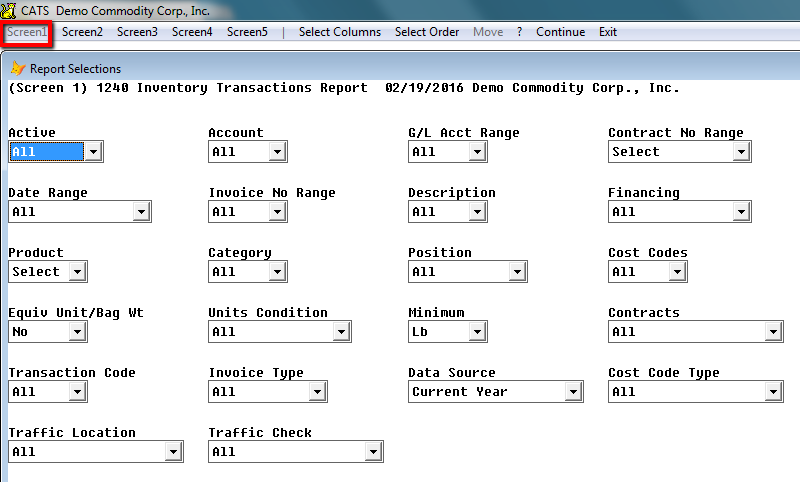
Units Condition- All, Only if Unit, Only if Weight, Units or Weight,
Units and Weight
Minimum- Units, Lb, Kg
Transaction Code- All, Select, Exclude, Match, Match Excluded
Data Source- Current Year, History, Charges Pending, Charge Journal,
Misc Charges
Cost Code Type- Valuation/Material, Valuation, Material, Non
Valuation
Traffic Location- Referenced, No Reference
Traffic Check- Customs Entry Number, Customs Entry Date, No Customs
Entry Number, No Custom Entry Date\
Screen 2
\
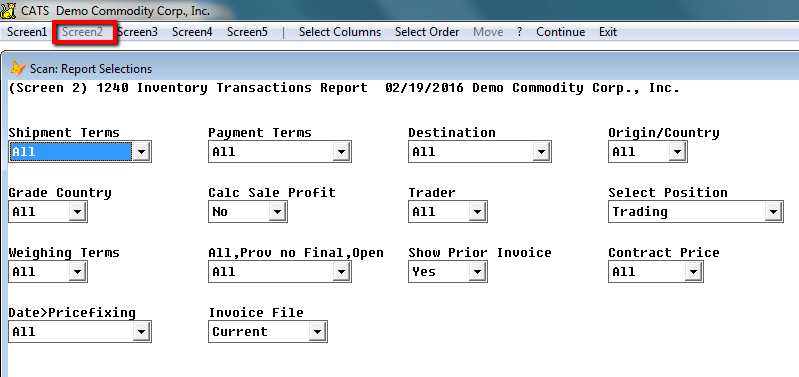
Grade Country- All, Select, Exclude, Match, Match Excluded\
** Calc Sale Profit**- No, Yes, Futures** Trader**- All, Select, Exclude, Match, Match Excluded\
Select Position- Trading, Shipment, Valuation, Differential
All, Prov no Final, Open- All, Prov/not final, Open Invoices, Open
or prov/not final, Modified
Show Prior Invoice- Yes, No
Date Price Fixing- Yes, No\
Screen 3
\
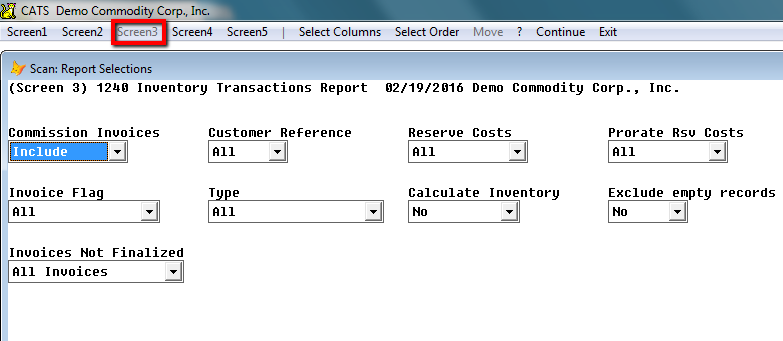
Commission Invoice- Include, Exclude, Only
Reserve Costs- All, Purchases, Sales
Prorate Reserve Costs- All, None, Reserved Amount, Actual Amount
Type- All, Sales Invoices, Cost Invoices, Charges/Costs, All, Prov
Purchase, Washouts, Finalized Purchases
Calculate Inventory- Current Changed, Current All, Completed, No
Exclude Empty Records- Yes, No
Invoices Not Finalized- All Invoices, Provisional Invoices\
Contract Status
Here are some options unique to contract status reports.\
Screen 1
Contract Status Report
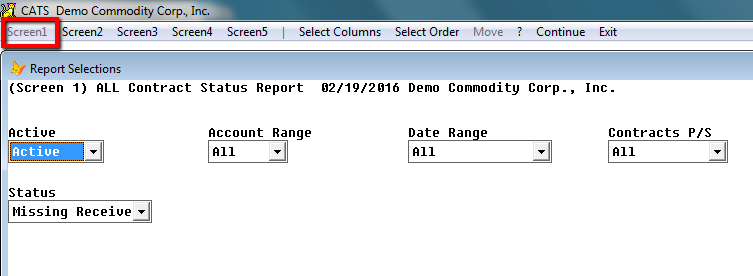
Account Range- All, Select, Exclude, Match, Match Excluded
Contract P/S- All, Purchases, Sales\
Status- All, Missing Received or Returned, Received or Returned\
Exception
Here are some options unique to exception reports.\
Physical Position Tied to Futures
Screen 1
\
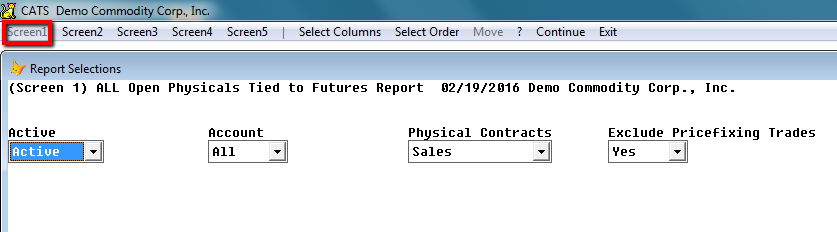
Physical Contracts- Sales, Open Purchases, Inventory
Exclude Pricefixing- Yes, No
Reservation Report
Screen 1
\
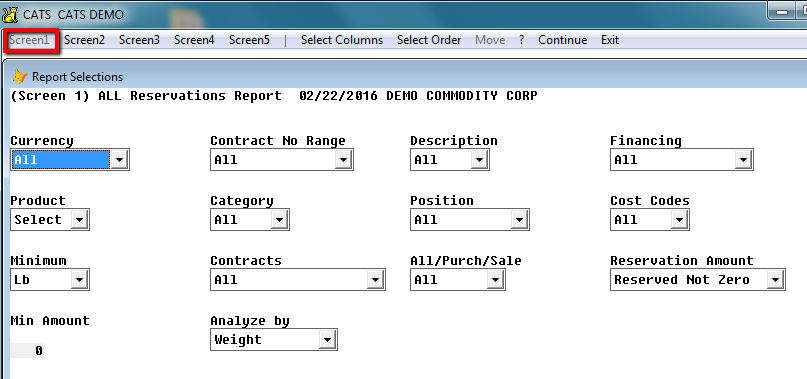
Reservation Amount- All, Outstanding, Reserved Not Zero, Zero
Analyze by- Weight, Units\
Reservation Report
Screen 2
\
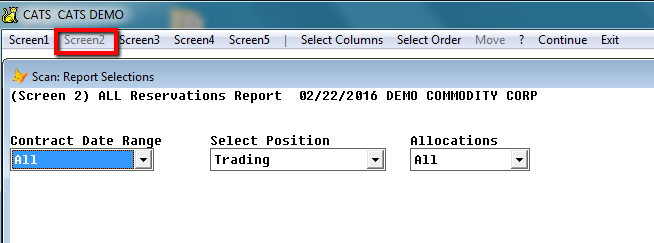
Select Position- Trading, Shipment, Valuation, Differential\
Description Codes and Values
\
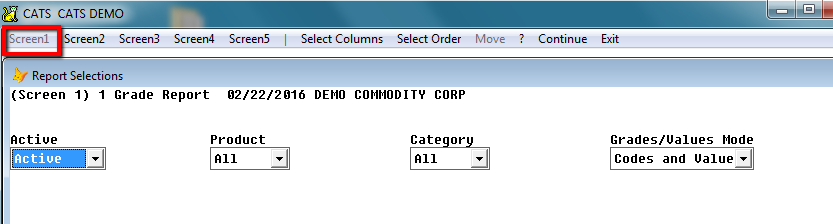
Grades/Values Mode-Codes and values, Future value, Destination value\
Tracking Report
Here are some options unique to tracking reports.\
Screen 1
\
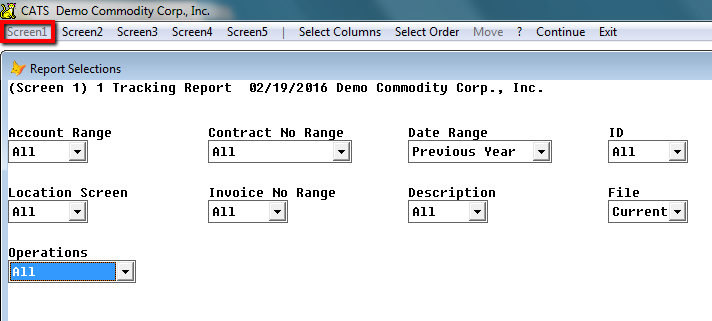
Operations- All, Quantity Change, Select from List\
Traffic Check
Here are some options unique to traffic check reports.\
Screen 1
\
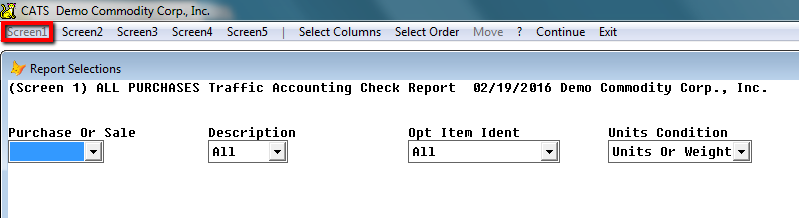
Purchase or Sale- Purchase, Sale\
Opt Item Ident-Select, Include, Match, MatchExcluded\
Units Condition-All, Only If Units, Only if Weight, Units or weight, Units and Weight
Futures Reporting
Here are some report options unique to futures reporting.\
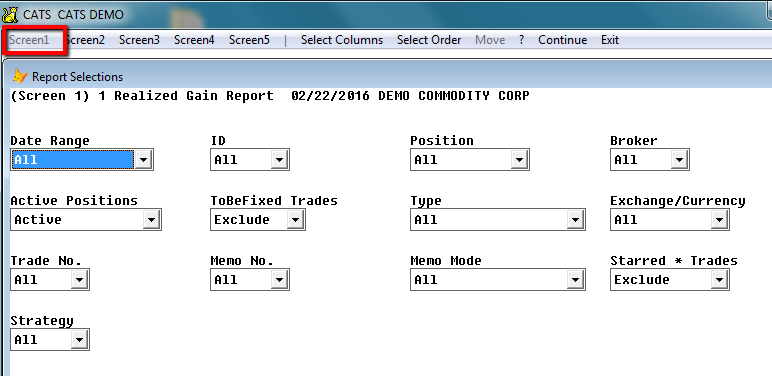
Open Futures Report (Screen 1)
Here are the filters unique to Open Futures Reports.
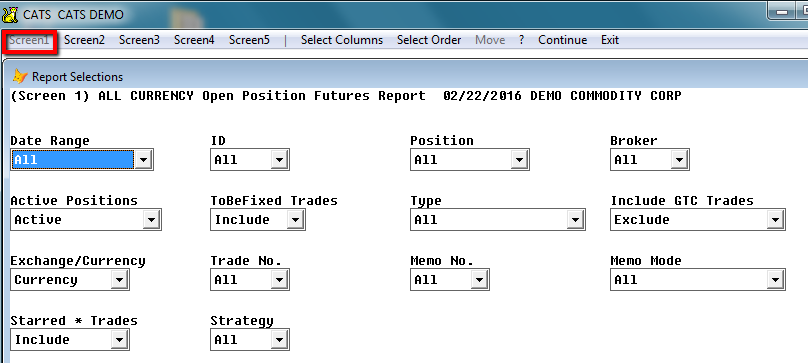
Date Range - Allows you to filter by Futures Trade date.
ID - All, Select, Exclude, Match, Match Excluded - Refers to the User ID that created the trade.\
Position - All, Select, Spot, Futures - Choose a range of positions or Spot (current month) or Futures (all except current month).\
Broker - All, Select, Match, Match Exclude - Show on the report only trades that have specific House Broker codes.\
Active Positions- All, Active - Include or Exclude positions on the exchange that are no longer active.\
To Be Fixed Trades - Include, Exclude, Only TBF - To-Be-Fixed trades, created by CATS to indicate that a price-fixing has not yet been completed, can be displayed or excluded on this report.\
Type - All, Hedge, Price Fix, Speculation, Combination, Exclude Combo, Exclude Price Fixing\
Include GTC Trades - Exclude, Include, Only GTC\
Exchange/Currency - All, Select, Currency, Commodity, One Item\
Trade No - All, Select, Exclude, Match, Match Excluded
Memo No - All, Select, Exclude, Match, Match Excluded, Any, None\
Memo Mode- Memos Trades Only, Exclude Memo Trades\
Starred Trades- Exclude, Include, Only Starred
Strategy- All, Select, Exclude, Match, Match Excluded, Any, None\
Entries Report (Screen 1)
The Entries report (showing all futures trades as they were entered instead of current status) has all of the report options the Open Futures report has, except for the Include GTC option.\
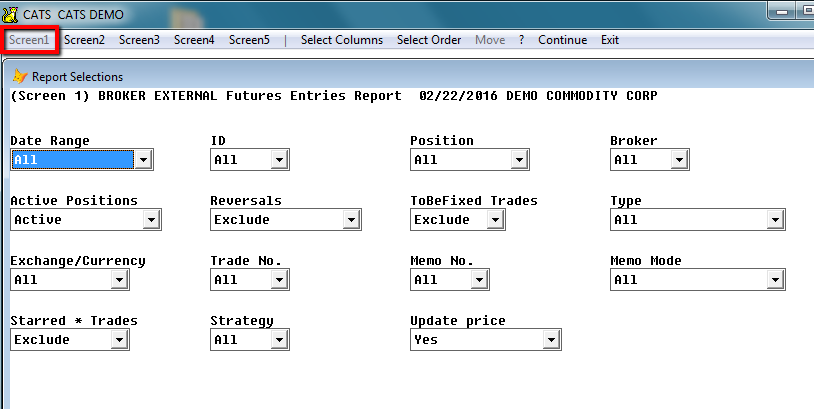
Reversals- Include, Exclude, Only\
Update Price- Yes, No, Yes/Exclude Missing\
Liquidated Report (Screen 1)
These are the same filters as for the Open Futures report, but the Include GTC Trades option is not available for this report.\
Loans
Loan Summary Report
\
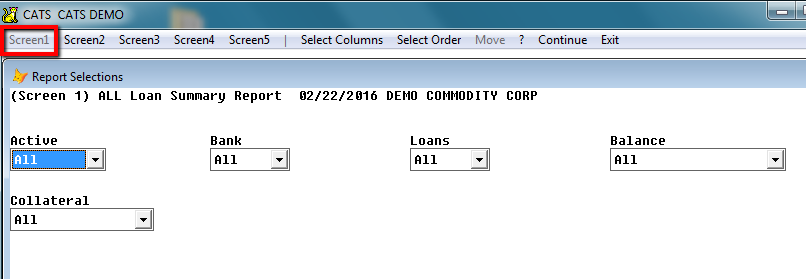
Bank- All, Select, Exclude, Match, Match Excluded, Any, None\
Loans- All, Select, Exclude, Match, Match Excluded, Any, None\
Balance- All, Active, Balance, Balance/Collateral, No Bal & No Colltrl, Balance Range\
Collateral- All, Inventory, No Inventory, Collateral, No Collateral, In Surplus, In Deficit\
Loan A/R Collateral Report
\
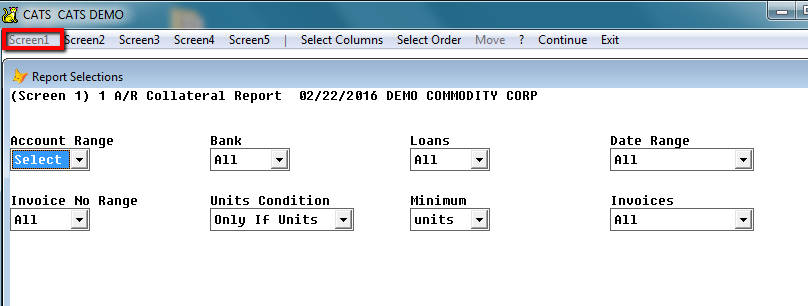
Account Range- All, Select, Exclude, Match, Match Excluded\
Invoice No Range- All, Select, Exclude, Match, Match Excluded\
Units Condition- All, Only if Units, Only if Weight, Units or Weight, Units and Weight\
Minimum- Units, Lb, Kg\
Invoices- All, Collateral, Not Collateral\
Accounting Trans Reports
Disbursements Screen 1
\
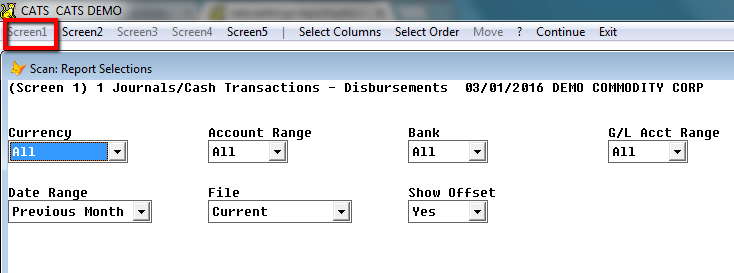
File- Journal, Pending, Current, History, Current and History
Show Offset- Yes, No\
Disbursements Screen 2
\
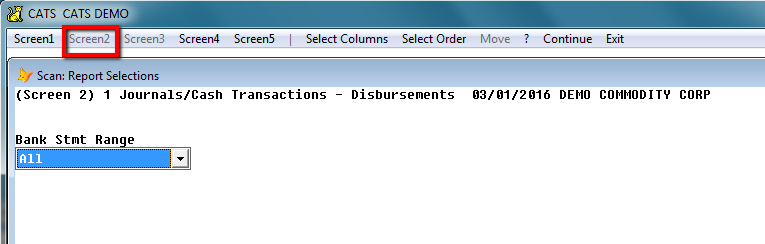
Bank Stmt Range- All, Select, Outstanding, Select & Outstanding
Receipt/Disbursements Screen 1
\
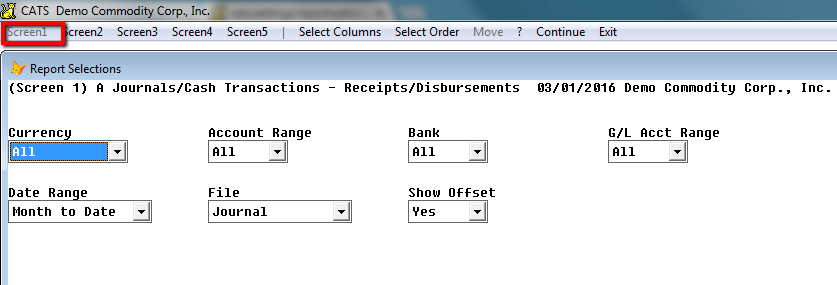
G/L Account Range- All, Select, Match, Match Excluded\
File- Journal, Pending, Current, History, Current & History\
Show Offset- Yes, No\
Invoicing Reports
Provisionals Not Finalized Screen 1
[]
Units Condition-All, Only if Units, Only if Weights, Units or Weight, Units and Weight\
Transaction Code-All, Select, Exclude, Match, Match Excluded\
Invoice Type-All, A/R Sales, A/P Sales\
Provisionals Not Finalized Screen 2
[]
Only if Wt/Units- Yes, No\
All, Prov no Final, Open- All, Prov/Not Final, Open Invoices, Open or Prov/Not final, Modified/ Finalized\
Show Prior Invoice- Yes, No\
Contract Price- All, Priced, Unpriced\
Date Pricefixing- All, Yes, No\
Invoice File- Current, History\
Provisionals Not Finalized Screen 3
[]
Reserve Costs- All, Purchases, Sale\
Prorate Rsv Costs- All, None, Reserved Amount, Actual Amount\
Invoice Flag- Select Any, Select All, Exclude Any, Excluded All, Advanced\
Report Of Open Invoices
[]