CATS 2411 - Release Notes
April 2024. The April update provides a new way to quickly enter purchase and sale contracts along with some quality of life improvements in other areas of CATS.
[NEW]Create new contracts in a batch.
Access the Batch Add feature from the Contracts section of the main
menu.
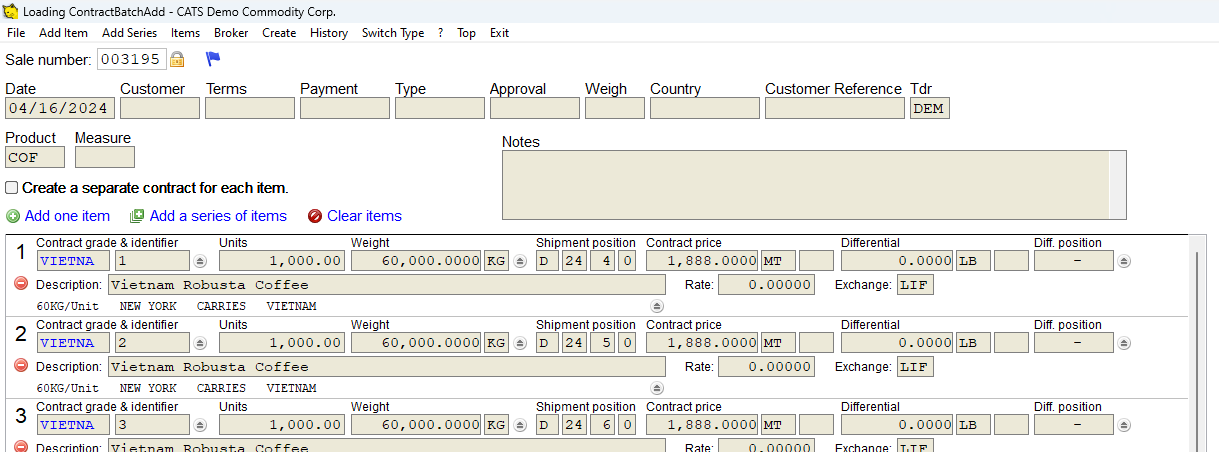
The new Batch Add contract feature allows users to quickly enter a
series of contracts (or a single contract with multiple items) from one
screen. All major details can be configured from this screen and the
contract confirmation letter can be generated automatically upon
completion.
Copy attached documents from another traffic screen.
Users can use the update tool on the traffic screen to copy attached
documents from one screen to another.
Better customization for shipping instructions and other traffic
documents.
The shipping instruction interface has been overhauled to better support
a wider range of content. The shipping instruction note fields also now
support custom labels. Using new keywords {Country}, {Category},
{Product} in templates will automatically insert those details from
the contract.
Reduced prompts for creating price fixing letter.
The confirmation prompt when creating the price fixing letter has been
eliminated.
Production can now copy traffic details from input to output.
When creating a re-bagging entry, CATS will automatically copy over the
traffic detail from the input location screen to the newly created
output location. The details include the container level information as
well.
Fixes for the new batch invoice dialog.
Improved sorting behavior and filters as well as fixes for reporting on
large number of invoices.
Use custom headings for note fields.
Using a custom heading on a note field in the report designer no longer
prints a blank column heading.