Accounting Setup
Accounting Setup
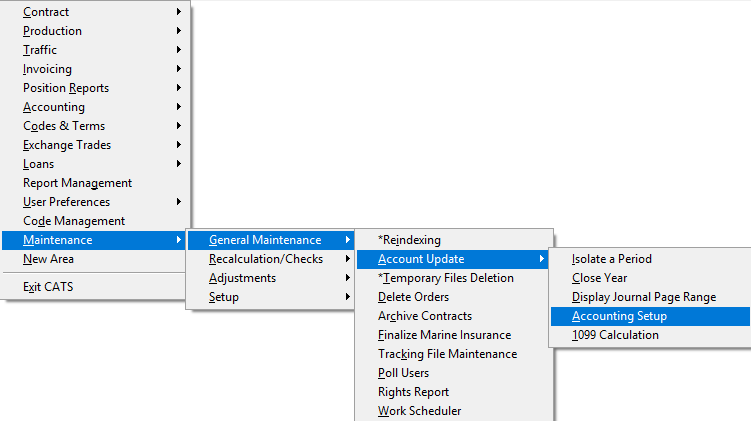
CATS allows the user to define a monthly period. The periods are used when Isolating a period and for the Accounting Recalculation, which accumulates the end-of-month totals for the G/L. Go to Maintenance > General Maintenance> Account Update > Setup
Periods 1 thru 12 can be changed to the date needed. If the accounting periods are changed then the accounting recalculation must be done to accumulate the correct amounts for each period. Periods 13 through 18 cannot be changed.
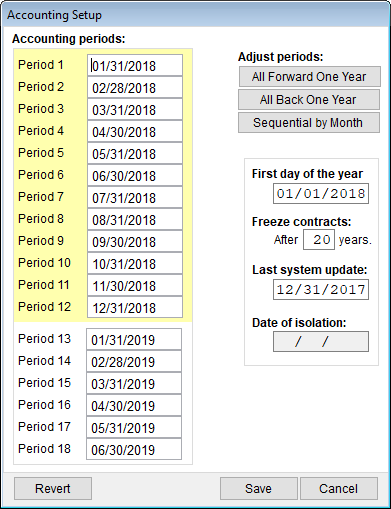
Adjust Periods:
All Forward One Year - Moves the currently entered period forward by
one year, e.g., 01/31/2019 would become 01/31/2020.
All back One Year
Sequential by Month
\
Press Save to continue, or Cancel to cancel changes.
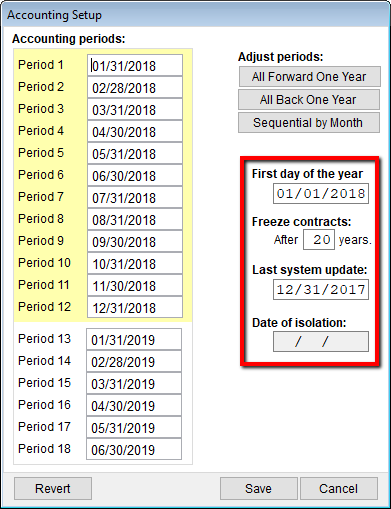
First Day of the Year - First day of your accounting year.
Freeze Contracts After X Years - This prevents posting to old
contracts. You may set the number of years.
Last System Update - A password will be required to post an item
that is earlier than or the same as the last update date.
Date of Isolation - A date appears when you are in an isolated
area.\
Press Save to continue, or Cancel to cancel changes.